Kubernetes & OpenShift Workloads
Kubernetes & OpenShift Workloads
sshs3 provides deep, native Kubernetes and Red Hat OpenShift management capabilities directly from your desktop. By combining interactive container exec terminals, streaming container logs, agentless pod file exploration, and live kubectl debug ephemeral troubleshooting containers, DevOps engineers can diagnose production issues with unprecedented speed.
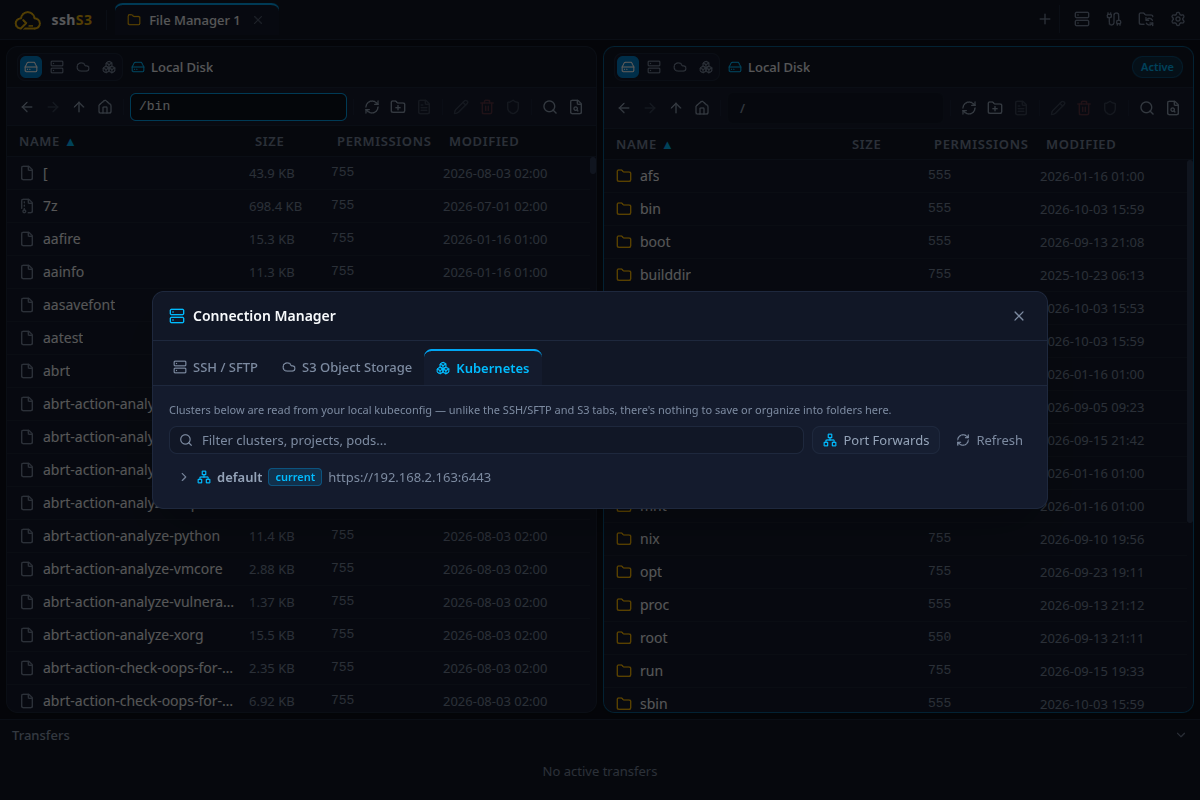
1. Automatic Cluster Discovery & Kubeconfig Watching
Feature: Live Kubeconfig Synchronization
🎯 Purpose
Deliver instant access to all configured clusters, namespaces, pods, and containers without manual setup, and automatically reflect changes when new clusters are added via CLI.
🛠️ How to Use
- Open the Connection Manager (Ctrl+Shift+O) or click the "+" menu in the tab bar.
- Select Kubernetes & OpenShift.
- All contexts from your workstation's
~/.kube/configdisplay in an expandable tree (Cluster → Namespace → Pod → Container). - Running
kubectl config use-contextor logging into new clusters via CLI immediately updates the sshs3 cluster tree in real time!
⚠️ Limitations & Caveats
- If a cluster relies on external CLI credential plugins (e.g. AWS EKS
aws eks get-tokenor Azure AKSkubelogin), the corresponding CLI tool must be installed and executable in$PATH.
⚙️ Technical Internals & Architecture
Monitors ~/.kube/config via fs.watch. To guarantee sub-500ms application launch times, @kubernetes/client-node is strictly lazy-loaded: the library loads only when the user expands or connects to a Kubernetes resource.
2. Interactive Container Exec & Streaming Logs
Feature: WebSocket-Backed Exec & Live Log Viewer
🎯 Purpose
Provide full interactive terminal sessions inside running containers directly within sshs3's split-pane layout without requiring external terminal windows.
🛠️ How to Use
- Launch Container Terminal: Select a container in the tree and click Exec (or double-click it). Choose the shell binary (
/bin/sh,/bin/bash, or custom). The session opens in a normal terminal tab that can be split (Ctrl+Shift+D / Ctrl+Shift+E). - Stream Container Logs: Select a container and click Logs. The logs open in a new tab that follows the container in real time: the last 1,000 lines first, then new output as it is written, with auto-scroll. The view is read-only; search it with Ctrl+F (Enter / Shift+Enter for next / previous match).
⚠️ Limitations & Caveats
- Exec requires a shell binary (
sh,bash) inside the container. For minimal distroless images, exec fails withexecutable file not found in $PATH(use Ephemeral Debug below!).
⚙️ Technical Internals & Architecture
K8sTerminalManager establishes a WebSocket/SPDY exec connection to the Kubernetes API server /exec endpoint. Streams connect directly to xterm.js, supporting full terminal mouse tracking and VT100 escape sequences.
3. Kubernetes Port Forwarding
Feature: Local Loopback Tunneling with Live Byte Counters
🎯 Purpose
Access private pod endpoints, internal database instances, or cluster microservices directly from local desktop tools (Postman, DBeaver, web browser) without defining public Ingress routes.
🛠️ How to Use
- Select a pod or container in the cluster tree and click Port Forward into pod (or Port Forward to this container).
- Specify the Container port (e.g.
5432for Postgres,8080for web apps) and the Local port. - Start the forward.
- The Port Forwarding view displays connection state, local address (
127.0.0.1:), and real-time inbound/outbound transfer rates (KB/s, MB/s) with total transferred byte counters.
⚠️ Limitations & Caveats
- Forwarded ports remain active only while sshs3 remains running.
- If the local port is already bound by another application on your workstation, the forward fails.
⚙️ Technical Internals & Architecture
Utilizes the Kubernetes API server /portforward subresource over SPDY/HTTP2, tunneling bidirectional TCP sockets directly to the target pod.
4. Agentless Pod File Explorer (K8sPodStorageProvider)
Feature: Browse & Edit Files Inside Running Pods
🎯 Purpose
Allow engineers to inspect generated application configs, crash dumps, or log files inside a running pod using the standard dual-pane file manager without installing SSH servers or debug agents inside the container.
🛠️ How to Use
- Select a container in the cluster tree and click Files (Browse container filesystem).
- The pod opens as a pane in the dual-pane file manager.
- Browse directory trees, download files to your workstation, upload files, modify permissions via
chmod, or edit files directly using your local desktop IDE!
⚠️ Limitations & Caveats
- Requires basic POSIX utilities (
tar,cat,ls) inside the container. - File modifications inside the container are ephemeral unless writing to a mounted PersistentVolume.
⚙️ Technical Internals & Architecture
K8sPodStorageProvider (src/main/storage/K8sPodStorageProvider.ts) implements IStorageProvider. It drives non-interactive tar and stream executions over the Kubernetes API, piping bytes directly into TransferPipeline.
5. Live Ephemeral Pod Debugging (kubectl debug)
When a container crashes, enters a CrashLoopBackOff state, or is built as a stripped distroless image lacking curl, tcpdump, or strace, traditional exec fails.
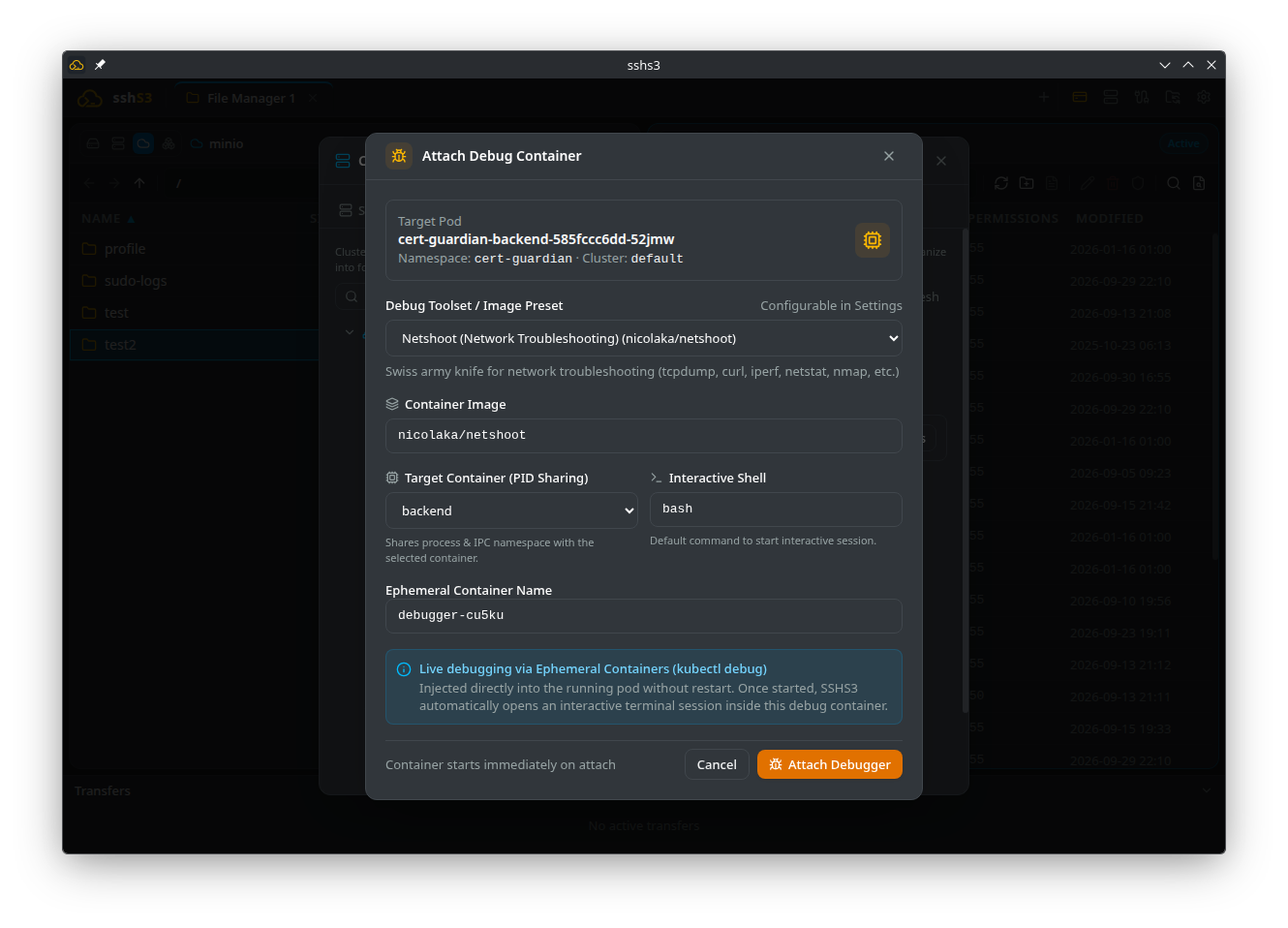
Feature: Non-Disruptive Ephemeral Debug Containers
🎯 Purpose
Debug production containers in real time by attaching a dedicated diagnostic container directly to the running pod's network and process namespace without restarting the application.
🛠️ How to Use
- Select a pod and click Debug (Attach ephemeral debug container (kubectl debug)). The Attach Debug Container dialog opens.
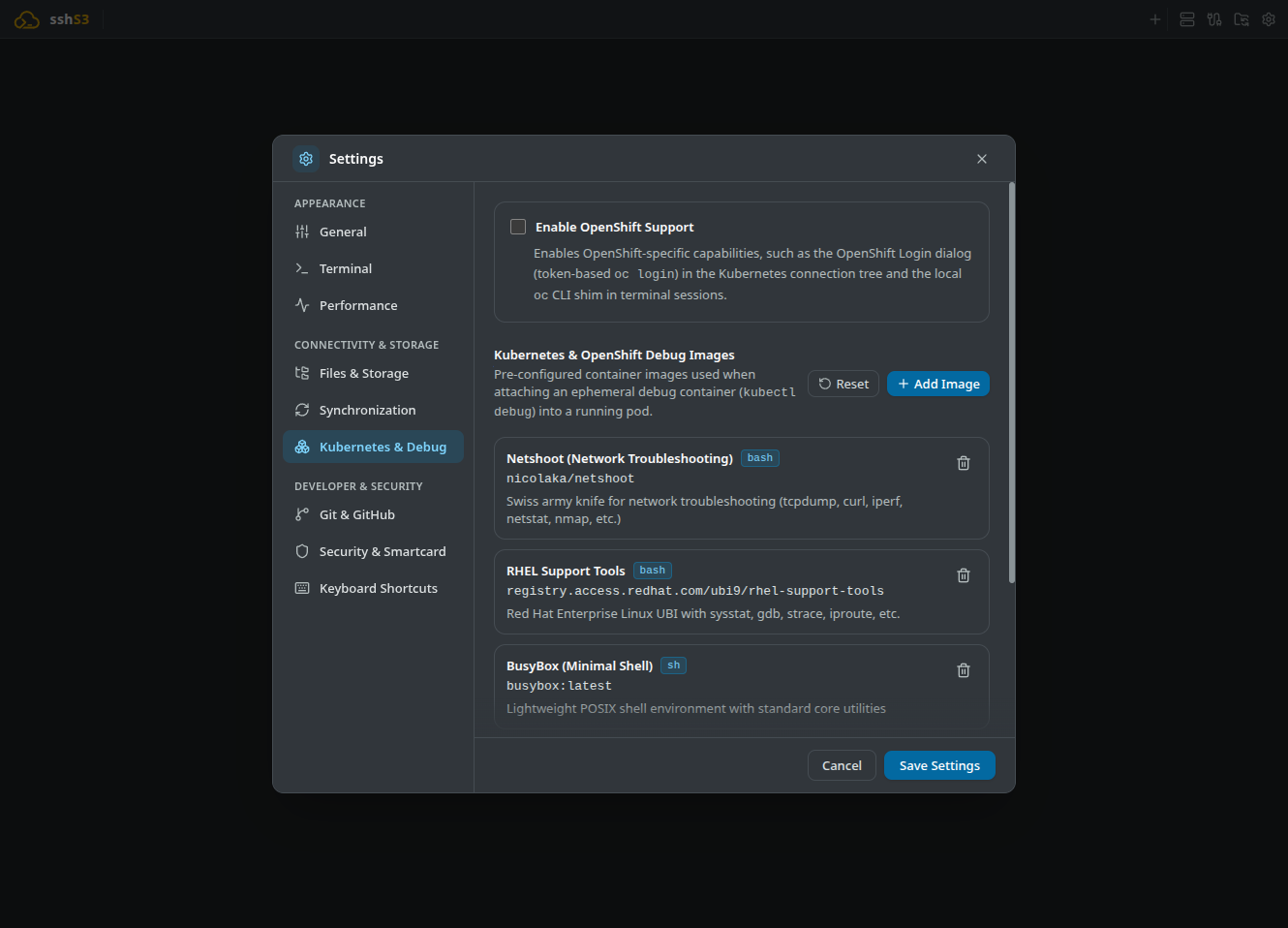
- Select a preconfigured diagnostic profile:
- Netshoot: Complete network troubleshooting suite (tcpdump, curl, iperf, dig, mtr, socat). - RHEL Support Tools: Enterprise system debugging (strace, gdb, sysstat, lsof, ubi9). - BusyBox / Curl / Ubuntu: Lightweight shells and utilities.
- Click Attach Debugger. sshs3 injects the debug container and automatically opens an interactive terminal sharing the target container's process namespace (
targetContainerName).
⚠️ Limitations & Caveats
- Requires Kubernetes 1.25+ (EphemeralContainers feature is GA).
- Cluster RBAC policies must grant
create/patchpermissions on thepods/ephemeralcontainerssubresource. - Once added, an ephemeral container cannot be removed individually; it terminates when the parent pod is evicted.
⚙️ Technical Internals & Architecture
Sends a strategic merge PATCH request to /api/v1/namespaces/{ns}/pods/{name}/ephemeralcontainers. By configuring targetContainerName, Linux PID namespace sharing is activated, allowing utilities like strace -p in the debug container to inspect processes running inside the target container.
6. Built-In OpenShift Login & CLI Shim
For enterprise environments running Red Hat OpenShift:
Feature: Web Console Token Authentication & CLI Shim
🎯 Purpose
Authenticate against OpenShift clusters via web console tokens without requiring manual installation of Red Hat's official oc binary on the workstation.
🛠️ How to Use
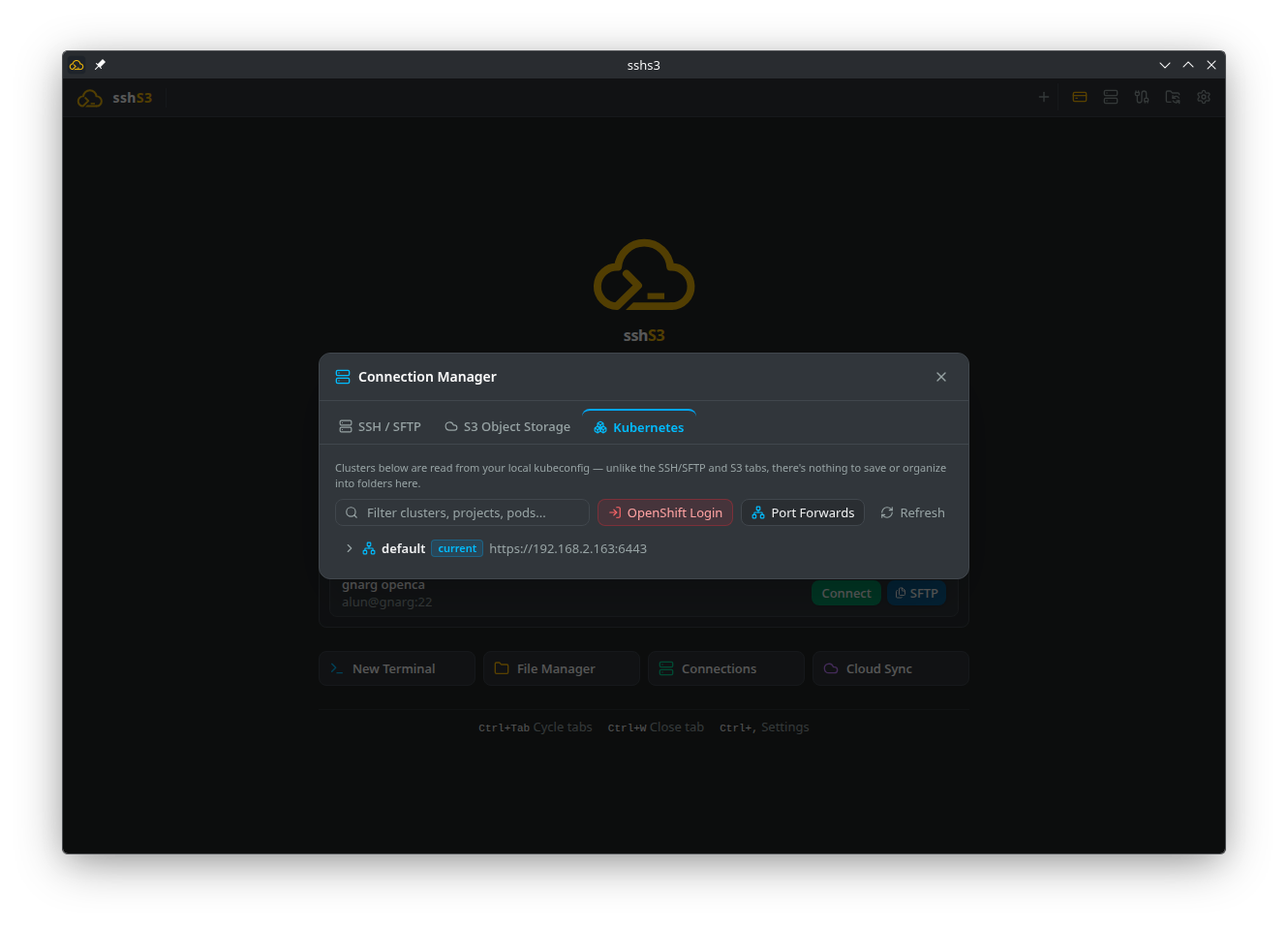
- Navigate to Settings → Kubernetes & Debug and check Enable OpenShift Support.
- In the OpenShift Web Console, click your username and select Copy Login Command.
- In sshs3, click OpenShift Login and paste the command (e.g.
oc login --token=sha256~... --server=https://api.openshift.example.com:6443). - sshs3 authenticates and adds the cluster context to
~/.kube/config. - In local shell tabs, commands like
oc whoami,oc project, andoc loginwork immediately thanks to sshs3's built-in CLI shim!
⚠️ Limitations & Caveats
- Opt-in feature enabled under settings.
- Token lifetime is governed by the OpenShift OAuth server (typically 24 hours).
⚙️ Technical Internals & Architecture
Parses cluster URL and SHA256 tokens, verifies identity against OpenShift APIs, and updates kubeconfig. An internal binary directory containing a lightweight Node.js CLI shim (ocShimCli.cjs) is prepended to $PATH for local shell processes.
7. Troubleshooting & Diagnostics Runbook
| Symptom / Error Message | Probable Root Cause | Corrective Action |
|---|---|---|
executable file not found in $PATH | Container is distroless and lacks /bin/sh | Use Debug (Attach Debug Container) to attach a Netshoot or BusyBox diagnostic container. |
pods/ephemeralcontainers is forbidden | RBAC role lacks permission for ephemeral containers | Contact your cluster administrator to obtain create/patch RBAC rights on pods/ephemeralcontainers. |
| Cluster missing from tree view | Context missing in ~/.kube/config | Run kubectl config get-contexts or import the cluster via the OpenShift login modal. |
| Port forward disconnects after 5 minutes | Cluster API server closed idle connection | Reconnect via the Port Forwarding manager; sshs3 features automatic reconnect logic. |