S3 Cloud & Object Storage
S3 Cloud & Object Storage
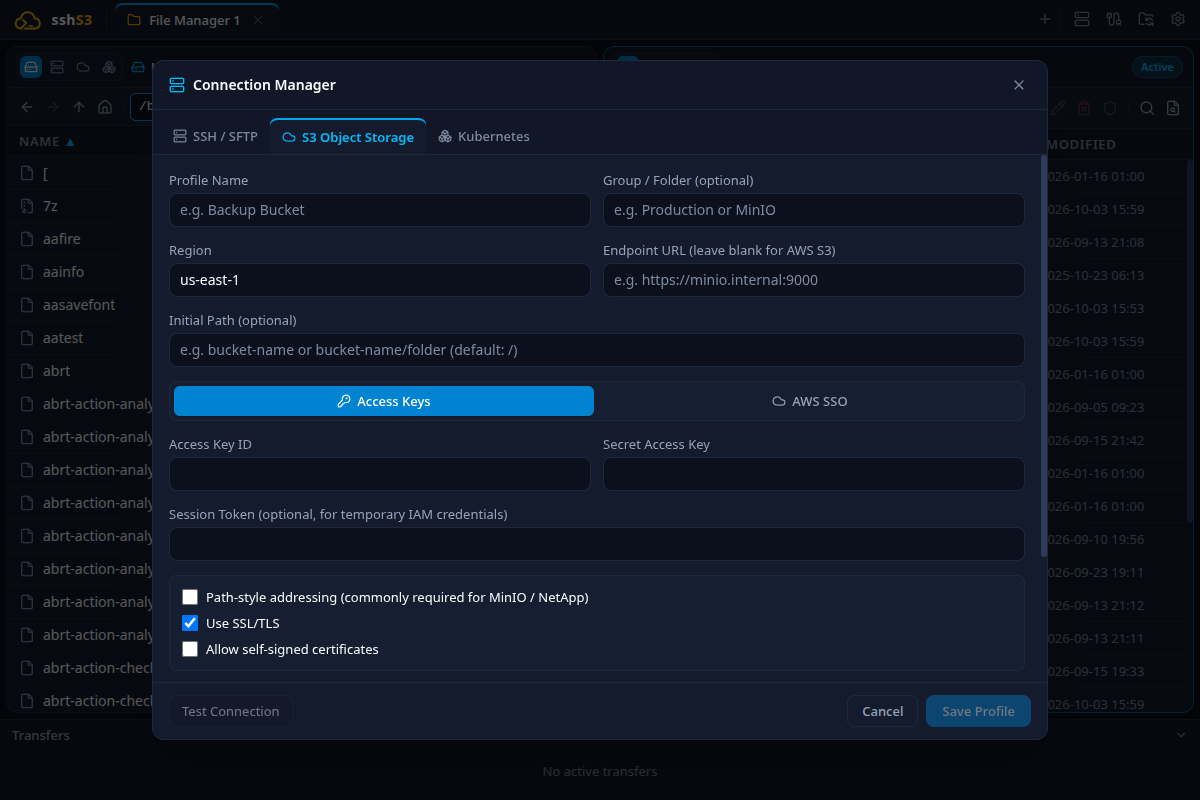
sshs3 provides a high-throughput, enterprise-grade cloud object storage client powered by the official AWS SDK v3 for JavaScript, integrated alongside your SSH servers and Kubernetes pods in the dual-pane file manager.
1. Supported Cloud Providers & S3 Compatibility
sshs3 provides native compatibility with all providers implementing the standard S3 API:
- Amazon Web Services (AWS S3): All standard commercial regions and GovCloud.
- Cloudflare R2: Zero egress fee object storage.
- MinIO: High-performance self-hosted on-premise clusters.
- Wasabi Hot Cloud Storage: Low-cost enterprise object backup.
- Backblaze B2 & DigitalOcean Spaces: S3-compatible cloud buckets.
- Ceph RGW & NetApp StorageGRID: Private enterprise storage fabrics.
2. Authentication Modes & AWS SSO Device Authorization
When configuring an S3 profile, sshs3 supports three authentication strategies:
A. Static IAM Credentials (Access Key & Secret Key)
- Standard authentication with Access Key ID and Secret Access Key.
- Encrypted securely at rest using the operating system keyring (
safeStorage). - Supports optional Session Token parameters for temporary STS credentials.
B. AWS SSO / IAM Identity Center (Enterprise Login)
For organizations managing AWS infrastructure through corporate Single Sign-On:
- Configure SSO Start URL (e.g.,
https://my-org.awsapps.com/start) and SSO Region. - Click Sign in with AWS SSO.
- sshs3 initiates the OIDC device authorization flow and launches your system browser displaying an 8-character verification code.
- Once authorized in the browser, sshs3 fetches temporary STS credentials and presents an interactive selector to choose your target AWS Account and IAM Role.
- Tokens refresh automatically in the background while the session remains active.
C. Custom Endpoints & Path-Style Addressing
When connecting to MinIO, Wasabi, Cloudflare R2, or internal Ceph clusters:
- Specify your custom Endpoint URL (e.g.,
https://s3.wasabisys.comorhttp://192.168.1.50:9000). - Path-Style Addressing:
> [!IMPORTANT] > For MinIO, private IP addresses, and custom endpoints, Path-Style Addressing is mandatory. It forces API requests in the format endpoint/bucket/object rather than virtual-hosted requests (bucket.endpoint/object), preventing DNS resolution failures on non-routable domains.
Feature: AWS SSO OIDC Device Flow
🎯 Purpose
Eliminate long-lived static IAM secret keys from developer workstations, adhering to enterprise Zero Trust standards with ephemeral STS tokens.
🛠️ How to Use
Follow step B above. Once authenticated, browse buckets and transfer files transparently.
⚠️ Limitations & Caveats
- Requires workstation access to the corporate AWS SSO portal via a web browser.
- Session expiration is governed by AWS Identity Center policies (typically 8–12 hours).
⚙️ Technical Internals & Architecture
AwsSsoAuthService (src/main/aws/AwsSsoAuthService.ts) invokes @aws-sdk/client-sso-oidc (StartDeviceAuthorizationCommand), polls the token endpoint, and retrieves role credentials via @aws-sdk/client-sso (GetRoleCredentialsCommand).
3. Presigned URLs for Secure File Sharing
Feature: Ephemeral Public File Sharing
🎯 Purpose
Share large files (database dumps, application logs, build artifacts) from a completely private S3 bucket with colleagues or clients without modifying bucket permissions or creating IAM accounts.
🛠️ How to Use
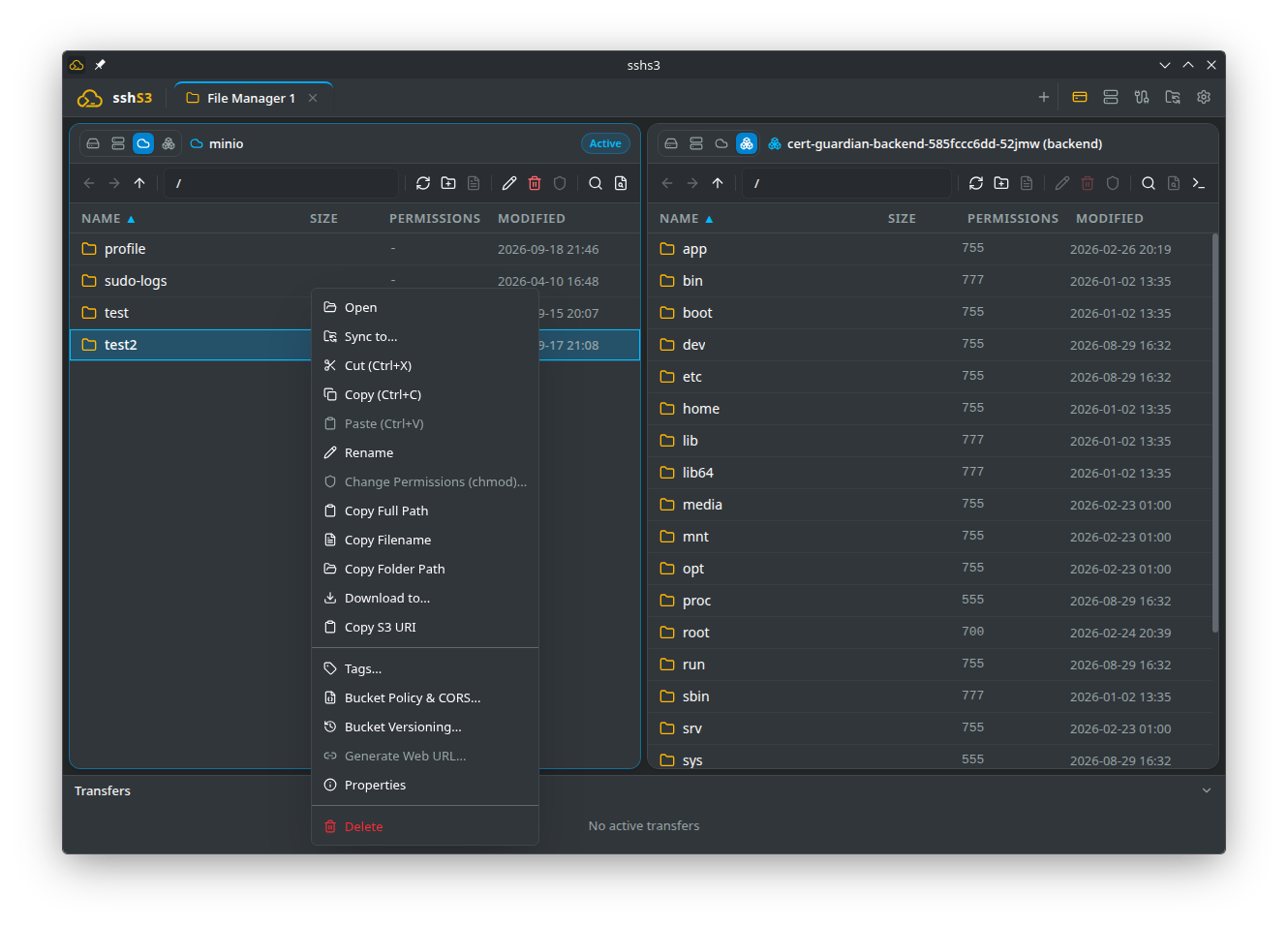
- Right-click any object in the S3 pane and select Generate Web URL....
- Choose Link expires after: 15 minutes, 1 hour, 12 hours, 1 day, or 7 days (maximum).
- Click Copy link. The link can be pasted into any browser or downloaded via
curl/wget.
⚠️ Limitations & Caveats
- Under AWS Signature Version 4 (SigV4), the maximum expiration time for presigned URLs using IAM credentials is 7 days (604,800 seconds).
- If generated using temporary AWS SSO/STS credentials, the URL's lifespan is capped by the remaining lifetime of the STS token (often 1–12 hours).
⚙️ Technical Internals & Architecture
Generated via @aws-sdk/s3-request-presigner (getSignedUrl) using GetObjectCommand. A SHA-256 HMAC signature is calculated incorporating your credentials, bucket, object key, and expiration timestamp, serialized into query parameters (X-Amz-Signature).
4. Object Versioning & History
Feature: S3 Version History & Rollback
🎯 Purpose
Protect critical cloud data against accidental deletions or overwrites by inspecting and rolling back object version histories.
🛠️ How to Use
- In a versioning-enabled bucket, right-click an object and select Object Versions.... To turn versioning on or off for the bucket, use Bucket Versioning... (Enable Versioning / Suspend Versioning).
- Displays the object's versions with their Version IDs, sizes and modification timestamps.
- Click Restore version (Restore as current version) to make a previous version active, or Delete version to permanently remove one.
⚠️ Limitations & Caveats
- Versioning must be enabled on the bucket at the cloud provider level.
- Storing multiple revisions of large files increases storage costs.
⚙️ Technical Internals & Architecture
Invokes ListObjectVersionsCommand on @aws-sdk/client-s3, sorting versions chronologically. Deletions create a DeleteMarker which can be removed to restore the object.
5. Bucket Administration, CORS & Cloud Tags
Feature: In-App S3 Bucket Configuration
🎯 Purpose
Administer bucket policies, Cross-Origin Resource Sharing (CORS) rules, and object metadata tags directly from the desktop client without logging into web management consoles.
🛠️ How to Use
- Right-click a bucket in the S3 explorer:
- Bucket Policy & CORS...: Inspect and edit the JSON bucket access policy and the CORS rules (allowed origins, HTTP methods, max-age) for web browser integrations. - Tags...: View and assign tags.
- In AWS SSO environments, sshs3 is compatible with the standard AWS CLI credential cache (
~/.aws/sso/cache/), reusing active tokens to prevent duplicate browser authentication prompts.
⚠️ Limitations & Caveats
- Requires administrative IAM permissions (
s3:GetBucketPolicy,s3:PutBucketPolicy,s3:GetBucketCORS,s3:PutBucketCORS).
⚙️ Technical Internals & Architecture
Dispatches typed AWS SDK commands (GetBucketPolicyCommand, PutBucketPolicyCommand, GetBucketCorsCommand, PutBucketCorsCommand) over the authenticated S3 client instance.
6. Troubleshooting & Diagnostics Runbook
| Symptom / Error Message | Probable Root Cause | Corrective Action |
|---|---|---|
ENOTFOUND | Virtual-hosted addressing used against an IP address | Enable the Path-Style Addressing checkbox in your S3 connection profile. |
SignatureDoesNotMatch | Invalid Secret Key or workstation clock drift | Check credentials. Ensure system time is synchronized via NTP (SigV4 tolerates max 15m skew). |
AccessDenied (403 Forbidden) | IAM policy lacks permissions on bucket | Ensure your IAM policy allows s3:ListBucket, s3:GetObject, and s3:PutObject. |
| Presigned URL expires after 1 hour | Generated via temporary AWS SSO/STS credentials | For 7-day URLs, configure a profile using static IAM credentials with explicit S3 permissions. |